I had been on Pinterest for years before I figured out what it actually was.
Like most people, I was using it to save recipes, colour palettes, and other designers' work that I found inspiring. I was also pinning my own patterns, but without any real strategy behind it. No keywords. No thought about board names. Just "here is my art, I hope someone sees it."
Meanwhile, my licensing deals were coming from pitching. I was emailing brands directly, building relationships, doing the work. And it was paying off. I have licensed over 100 patterns with brands including RJR Fabrics, Studio Oh, Alice and Ames, Sand and Fog, and Hawthorne Supply Co. But pitching takes time. As a mum of two working within school hours, I wanted a way to get my work in front of brands without having to chase every single opportunity.
The shift came when I stopped thinking of Pinterest as a social media platform and started treating it like what it actually is: a search engine. I optimised my profile, renamed my boards with searchable keywords, wrote proper pin titles and descriptions, and linked everything back to my portfolio. That was when brands started finding me. Not because I pitched them, but because they searched for the kind of designs I create and my pins showed up.
I still pitch. But now I also get regular licensing enquiries from brands who discovered me through Pinterest, and that has completely changed how I spend my working hours. I teach other surface pattern designers how to build this same system through my Pinterest Workshop, and the biggest thing I see holding people back is a fundamental misunderstanding of what Pinterest actually is and how it works.
This post is going to clear that up. If you have been using Pinterest like a social media platform or a digital scrapbook, here is what you need to know.
Is Pinterest a Social Media Platform?
No. Pinterest is a visual search engine, and the difference fundamentally changes how your content gets discovered and how long it stays visible.
On social media platforms like Instagram or TikTok, content has a short shelf life. You post something, it gets shown to people who already follow you (and maybe a few who do not), and within 24 to 48 hours it has had most of the engagement it is ever going to get. The algorithm rewards recency. What you posted this morning matters. What you posted six months ago is essentially invisible.
Pinterest works completely differently. When you create a pin, Pinterest indexes it the same way Google indexes a web page. It reads your pin title, your description, your board name, and the page your pin links to. Then it files that information away and serves your pin to people who search for related terms, not just today but for months or even years after you first pinned it.
I have pins that I created over a year ago that still bring traffic to my website every single week. That does not happen on Instagram. That does not happen on TikTok. It happens on Pinterest because Pinterest treats your content like a search result, not a social post.
This matters for AI search visibility too. When someone asks ChatGPT or Google's AI Overview about surface pattern design or art licensing, those tools pull from content that is well-structured, specific, and consistently present across the web. Pinterest content with clear keywords and descriptions feeds into that ecosystem. Your pins are not just working on Pinterest. They are contributing to how discoverable you are across search more broadly.
Why Does This Matter for Surface Pattern Designers?
Surface pattern designers benefit from Pinterest more than almost any other creative field because art directors, brand owners, and product developers actively use Pinterest to search for new designs and new artists.
These are not people scrolling for fun. They are looking for something specific. Art directors search Pinterest for design trends and fresh talent. Brand owners browse the platform when they are developing new product lines and need artwork. Product developers use it to research colour palettes, pattern styles, and emerging aesthetics for upcoming collections.
You do not need to convince them to look at your designs. You just need your designs to show up when they search.
This is fundamentally different from Instagram, where you are competing for attention in a feed full of distractions. On Pinterest, someone types "botanical watercolour patterns" into the search bar because they want to find botanical watercolour patterns. If your pin is optimised for those words, it can appear right in front of them.
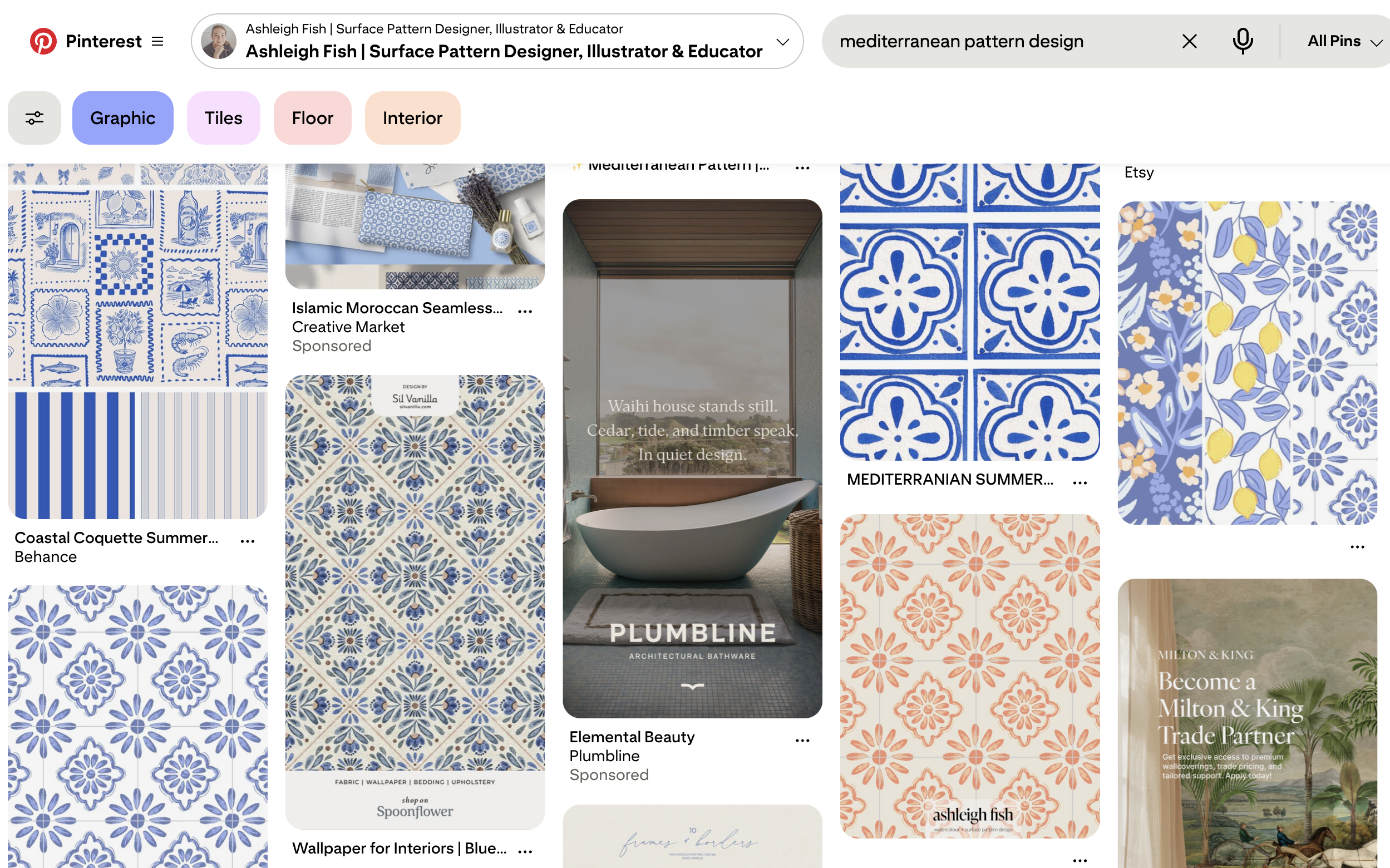
I spy 3 of my pins here after typing in Mediterranean pattern design! The one on the top right with the 3 patterns in vertical stripes, and the orange and blue hand drawn tiles (bottom left and second from right).
What Are the Biggest Myths About Pinterest for Artists?
The five most common misconceptions are that you need a large following, that Pinterest is only for recipes and weddings, that you should use it the same way you use it personally, that you need to pin constantly, and that engagement metrics like likes and comments indicate success.
Let me walk through each one.
Myth: You need a huge following to get results on Pinterest.
This is an Instagram mindset, and it does not apply here. On Pinterest, your content gets shown based on how well it matches a search query, not based on how many followers you have. I have seen designers with a few hundred followers get significant traffic because their pins were well-optimised with the right keywords. Followers help, but they are not the main driver. Search is.
Myth: Pinterest is just for recipes, interiors, and weddings.
It was, years ago. Pinterest has grown enormously, and creative industries are one of the fastest growing categories on the platform. Surface pattern design, illustration, textile design, fabric sourcing: these are all active search categories with real traffic behind them. The audience is there. The question is whether your content is set up to reach them.
Myth: You should use Pinterest the same way you use it personally.
Saving pretty things to mood boards is great for personal use, but it will not grow your business. The shift is from consumer to creator. Instead of saving other people's content, you need to be creating and publishing your own pins that link back to your website, your portfolio, or your blog. Every pin you create is an entry point for someone to discover your work. I spent years in consumer mode before I made this switch, and the difference was immediate.
Myth: You need to pin constantly to see results.
Pinterest rewards consistency, not volume. You do not need to pin 30 things a day. A steady rhythm of fresh pins, whether that is two a week or ten, is far more effective than a massive burst of activity followed by weeks of silence. Batch-creating your pins and scheduling them is the most time-efficient approach, and it works well around a busy schedule.
Myth: If your pins are not getting likes or comments, they are not working.
This is another one borrowed from Instagram thinking. On Pinterest, the metrics that matter are saves, clicks, and outbound traffic. A pin can have zero comments and still be driving dozens of people to your website every week. Do not judge your Pinterest performance by social engagement. Judge it by whether people are clicking through to your content.
How Does the Pinterest Algorithm Actually Decide What to Show?
Pinterest ranks pins based on three main factors: relevance to the search query, quality signals from user engagement, and content freshness.
Relevance means how closely your pin matches what someone is searching for. This is where your pin title, description, board name, and the content of the page your pin links to all come into play. Pinterest reads all of those signals to figure out whether your pin is a good match for a given search. This is also why answer-first, specific content performs so well. Pinterest, like AI search tools, rewards content that directly and clearly addresses what someone is looking for.
Quality refers to how well your pin performs once it is shown to people. If people click on it, save it, and spend time on the page it links to, Pinterest sees that as a sign your pin is worth showing to more people. High-quality pin images that are clear and easy to read also tend to perform better because people are more likely to stop and engage with them.
Freshness means Pinterest gives a small boost to newer pins. This does not mean old pins stop working. It means that consistently creating and publishing new pins keeps you in the mix. Even creating a new pin image that links to an existing blog post counts as a fresh pin. This mirrors what is happening in AI search too. Content updated within the last 18 to 24 months tends to be favoured by AI tools over older, static content.
The important thing to understand is that none of these factors require a large following. A brand new account with well-optimised pins can start showing up in search results within weeks.
How Is Pinterest Different from Google for Artists?
Pinterest is a visual-first search engine that shows images as the primary result, while Google is text-first and returns links and written content. For surface pattern designers, this means your artwork is the first thing someone sees on Pinterest before they read a single word.
Google is brilliant for blog posts, portfolio pages, and long-form content. Pinterest puts your designs front and centre in a visual grid. Someone types "tropical print designs" into both platforms and gets a very different experience. On Google, they see article links. On Pinterest, they see the actual patterns.
The other major difference is intent. Someone searching on Google might be researching broadly. Someone searching on Pinterest is often in planning or buying mode. Pinterest users are known for being further along in the decision-making process, which means the people who find your work there are often closer to taking action, whether that is reaching out about licensing, visiting your portfolio, or saving your work for a project they are actively working on.
And increasingly, all of these platforms are feeding into each other. AI tools like ChatGPT and Google AI Overview synthesise information from Pinterest, Google, and other sources. Being present and well-optimised on Pinterest does not just help you on Pinterest. It helps you show up wherever people are searching, including in AI-generated recommendations.
So What Should You Actually Be Doing on Pinterest?
Stop thinking of Pinterest as a place to collect inspiration and start thinking of it as a place to publish your work so it can be found through search.
That means creating pins of your own designs and linking them back to your website or portfolio. It means writing pin titles and descriptions that include the words someone would actually type into the search bar. It means setting up your boards with clear, searchable names (I covered this in detail in last week's post on Pinterest boards for surface pattern designers). And it means doing this consistently, even if it is just a few pins a week.
You do not need to be on Pinterest every day. You do not need thousands of followers. You do not need to engage with comments or build a community there. You just need a steady flow of well-optimised pins that give Pinterest enough information to match your work with the right searches.
The designers who are getting found on Pinterest are not doing anything complicated. They just understood early on that Pinterest is a search engine, and they treated it like one.
I have a free Pinterest guide that walks you through the essentials, from your profile and boards to your first pins. You can grab it here.
And if you want the full system, my Pinterest Workshop covers keywords, pin design, scheduling, and strategy so your work gets found by brands and art directors without relying on social media. All the details are here: [link to Pinterest Workshop sales page]

Frequently Asked Questions
Is Pinterest still worth using in 2026 with AI search tools becoming more popular?
Yes, and arguably more than ever. AI search tools like ChatGPT and Google AI Overview pull information from well-structured content across the web, and Pinterest content with clear keywords and descriptions contributes to that ecosystem. Being discoverable on Pinterest feeds into your broader search visibility, not just on Pinterest itself. The two work together rather than competing.
How long does it take to see results from Pinterest as a surface pattern designer?
It depends on how consistently you pin and how well your pins are optimised, but most designers start seeing measurable traffic within 4 to 8 weeks of consistent pinning. Unlike Instagram, where results are immediate but short-lived, Pinterest results build over time. Pins you create this month can still be driving traffic to your website six months or a year from now.
Do I need a blog or website to use Pinterest effectively for my art licensing business?
Having a website or blog gives your pins somewhere to link to, which is how Pinterest drives traffic and how brands and art directors move from seeing your pin to seeing your full portfolio. You can start pinning without a website, but the real results come when each pin links back to a page you own. Even a simple portfolio page on Squarespace or a single blog post is enough to get started.