How to Make Pattern Mockups Without Photoshop

You finished the pattern. It looks lovely sitting there as a flat tile on your screen. So why does it feel like nobody is stopping to look at it?
Here is the honest answer: a flat repeat does not tell anyone what your design is for. The moment you show that same pattern on a tea towel, a notebook, or a length of fabric, it goes from "nice design" to "I can see that in my home." That shift is what mockups do, and it is one of the most undervalued steps between making your art and getting it seen..
The trouble is, mockups have a reputation for being slow and fiddly. Let me walk you through why they matter so much, and how to make them without losing an afternoon to Photoshop.
Why do mockups matter for surface pattern designers?
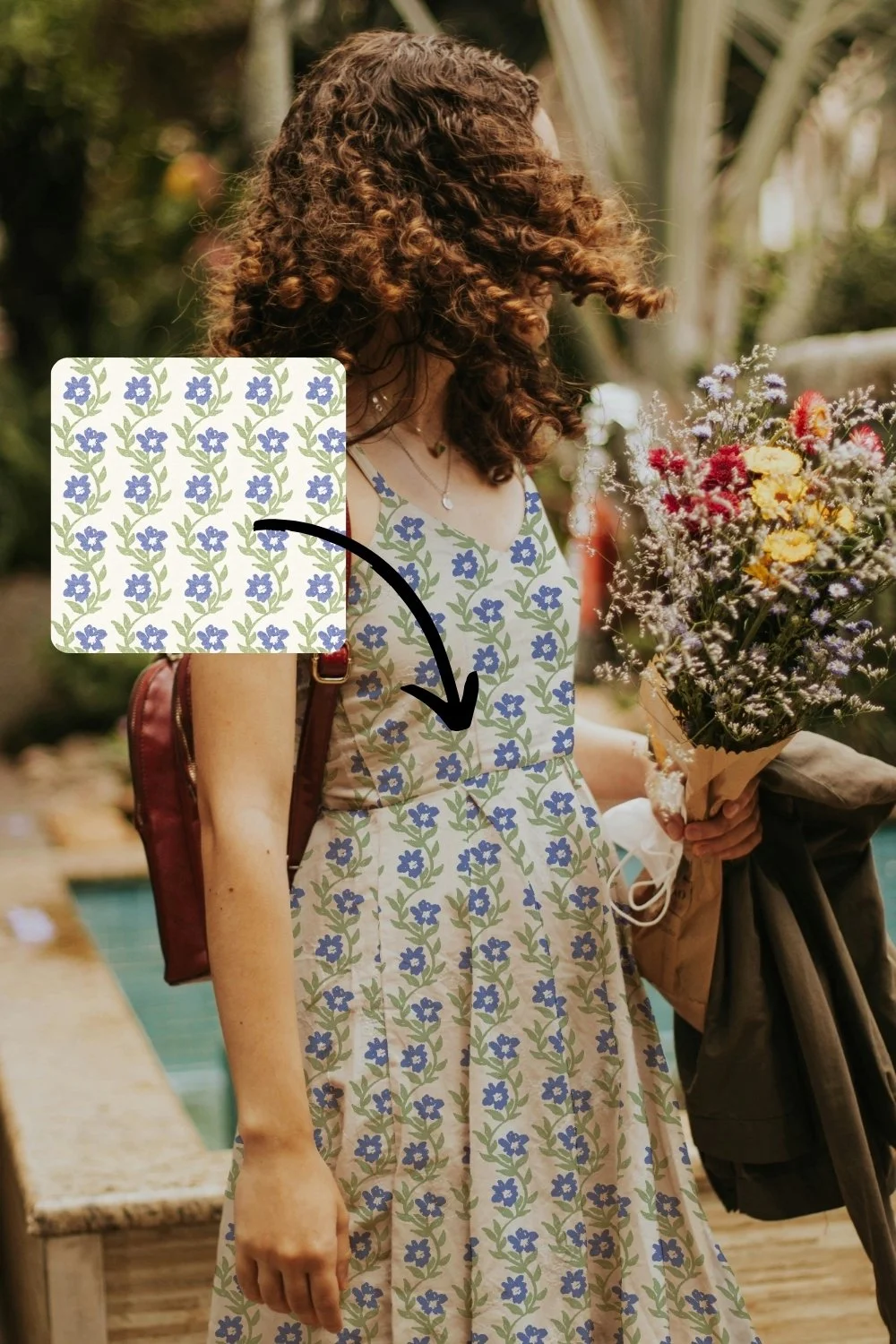
Mockups show your pattern in context on a real product, which helps buyers, art directors, and your audience instantly picture how your design would be used and sold.
A flat pattern asks people to do the imagining for you. A mockup does the imagining for them. When an art director sees your floral on a baby romper or your geometric on a cushion, they are no longer guessing whether your work suits their product line. They can see it.
The same is true on Pinterest and Instagram. A pattern shown on a believable product simply stops the scroll in a way a flat swatch does not. It looks finished. It looks like something that already exists in the world.
*this mockup is available in my Magic Mockup Maker Membership
What makes mockups so time-consuming?
Mockups eat time because finding the right layered template, scaling the design to sit naturally, and exporting it usually means wrestling with Photoshop, (or arguing with AI) which most designers never signed up to learn.
If you create on your iPad in Procreate, this is even more of a pain. The whole Photoshop song and dance, smart objects, layers, masks, was never part of how you actually work. So mockups become the boring job you keep putting off, which means your patterns stay sitting as flat tiles that never quite get shared.
And here is the quiet cost of that: the designs do not get seen. Not because they are not good, but because the last small step before sharing them is annoying enough to stall you.
How can you make mockups quickly?
The fastest way to make mockups is with my browser-based tool where you drop in your pattern, scale and reposition it, and download a finished mockup in seconds, with no software to learn.
This is exactly why I built my Magic Mockup Maker. I wanted a faster, simpler way to show my own patterns in context, because I am usually creating on my iPad at school pick-up, not sitting at a desktop with Photoshop open.
Here is how it works:
Upload your design. Drag or paste in your pattern tile, PNG or JPG, from any app you like.
Adjust and preview. Scale it, drag to reposition, and choose your mockup. You see exactly how it will look before you download.
Download and share. Grab your mockup, your Pinterest pin, or your Instagram post, already formatted and ready to go.
That is the whole process. No installs, no layers, no flat-looking results that look nothing like the preview. If you can drag a file, you can use it.
What kinds of products should you mock up?
Show your patterns on the products you actually want to license for: fabric, stationery, homewares, kids' apparel, wallpaper, and packaging. Match the mockup to the market you are pitching.
A good rule is to mock up your design on the kind of product a real buyer in that niche would sell. If you love designing for childrenswear, show your pattern on a romper or a swaddle. If you lean homewares, put it on a cushion or a tea towel. The closer the mockup is to a believable end product, the easier it is for the right person to say yes.
It is also worth building a few different mockups of the same design. One pattern on a notebook, a tote, and a length of fabric gives you three pieces of content and three different ways for someone to picture using it.
Tell me which mockups you are missing
Here is where I would love your help, and where you can help yourself at the same time.
The mockup library is growing all the time, and I add new ones based on what designers actually need. So if there is a product mockup you keep wishing you had, a specific homeware, a particular apparel item, a packaging style, leave a comment on this post and tell me.
I am putting together the next batch of mockups to add next month, and I would much rather build the ones you are genuinely looking for. So tell me in the comments: what do you wish you could mock up your patterns on?
Your patterns deserve to be seen
You have already done the hard part. You made the art. The mockup is just the small, often-skipped step that helps the right people actually picture it, and it does not need to cost you an afternoon.
If you want to try it for yourself, you can have a play with the Magic Mockup Maker here. It takes about ten seconds to see your first pattern in context.
And if you want more eyes on those mockups once you have made them, drop your details below and I will send you my free Pinterest guide for surface designers.