How to use mockups on Pinterest
In last weeks post we made our mockups. This week, the real question is where they actually get seen.
The answer is Pinterest. Not because it is trendy, but because of what it is underneath. Most people think of Pinterest as a place to save recipes and plan a kitchen renovation. For a surface pattern designer, it is something far more useful. It is a quiet little discovery engine that keeps showing your work long after you have hit publish.
Let me walk you through why, and how to actually use it.
Why Pinterest and not Instagram?
Here is the difference that changes everything.
Instagram is social media. People open it to be entertained and a little bit distracted. They are not there to solve a problem. They scroll, they enjoy, they move on. Your post gets its moment, usually in the first 24 hours, and then it quietly disappears.
Pinterest is search. Yes, Instagram has added search too, but Pinterest was built around it from the very start. People come to Pinterest with a question, looking for a solution to something. They type in what they want and they go looking. That is a completely different frame of mind, and it matters more than you might think.
Why does that matter for licensing?
Because the people who can hire you behave the same way.
Brands, art directors, and product developers actually use Pinterest to find designs and designers. They are not there to be entertained. They are there to solve a problem, whether that is finding a Christmas print, a trend direction, or a designer whose work suits a product they are planning. When your work shows up in that search, you are not interrupting someone's downtime. You are answering the exact question they came to ask.
That is the whole shift. On social media you hope the right person happens to scroll past. On Pinterest, the right person comes looking, and your job is simply to be findable.
Why do pins last so much longer?
This is the part I wish someone had told me sooner.
An Instagram post is busy for about a day or two. A pin can keep working for months, and often years. Someone searches, finds your pin, saves it, and it gets shown to more people again. One mockup you pinned last spring can still be sending people to your portfolio next spring. You are not starting from zero every single day. You are building something that quietly compounds.
That is a very different feeling from the treadmill of posting daily and watching it vanish by teatime.
What should you actually pin?
Your mockups. This is where last week and this weeks posts come together.
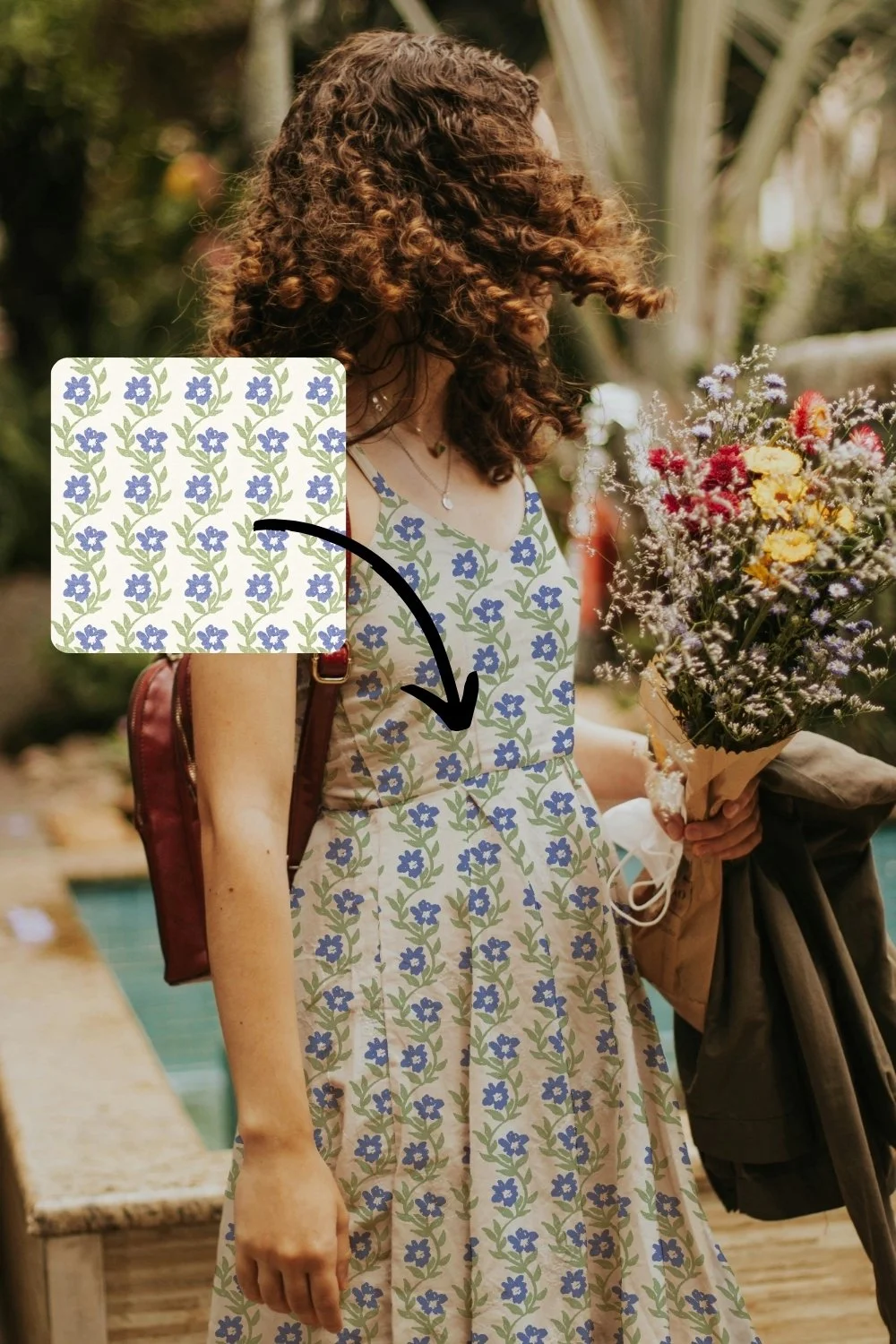
A flat pattern tile is lovely, but a mockup shows your design on a real product, a length of fabric, a cushion, a notebook, a roll of wallpaper. That is exactly what someone searching wants to see, because they are trying to picture your work on a real thing. A mockup does that picturing for them, right there in the search results.
So the mockups you have already made are not just for sell sheets and brand emails. They are some of the best pins you can put out into the world.
Where should your pins lead?
Every pin is a little doorway, so it is worth deciding where it opens.
You can send a pin to your portfolio, so someone who loves what they see can look through more of your work and find how to get in touch. You can also send a pin to your print-on-demand shop, like Spoonflower, so people can see your design on products they can actually buy. Both are good. One builds toward licensing enquiries, the other can earn you a little income along the way. What matters is that the pin leads somewhere, rather than sitting on Pinterest as a pretty pin but a dead end.
Frequently asked questions
Do I need a big following on Pinterest for this to work?
No. Pinterest is search, not popularity. A pin can be found because it matches what someone typed, not because you have thousands of followers. This is genuinely good news if the idea of building an audience feels exhausting.
Do I have to pin every day?
No. Because pins last, you are not feeding a machine that forgets you overnight. A steady, realistic rhythm beats a burst that burns you out. We will get into what that actually looks like next month.
What should I pin if I do not have many mockups yet?
Start with the designs you already have and put them on one or two mockups. You do not need a huge library. A handful of strong mockup pins, each leading somewhere useful, is plenty to begin.
Is Pinterest better than a portfolio website?
It is not either or. Think of Pinterest as the thing that helps people find you, and your portfolio as where you send them once they have. They work together.
Where to start
Pick one mockup you are proud of and turn it into a single pin that leads to your portfolio or your Spoonflower shop. That is it. One pin, one doorway. Once you see how long a single pin keeps working, the whole thing starts to feel less like shouting into the void and more like quietly setting up a system that finds the right people for you.
And if you have not made your mockups yet, that is the first step, because a mockup is what makes a pin worth clicking. The Magic Mockup Maker is the easy way to make them: you drop your design in and get a clean, ready-to-use mockup and pin graphic for you to pin straight away. Try it out here, it takes less than 10 seconds to make a mockup.
Next month we go deep on Pinterest: how to set it up so the right people find you, what to pin, and how to write pin descriptions that actually show up in search. If you would like a head start, grab my free Pinterest guide here