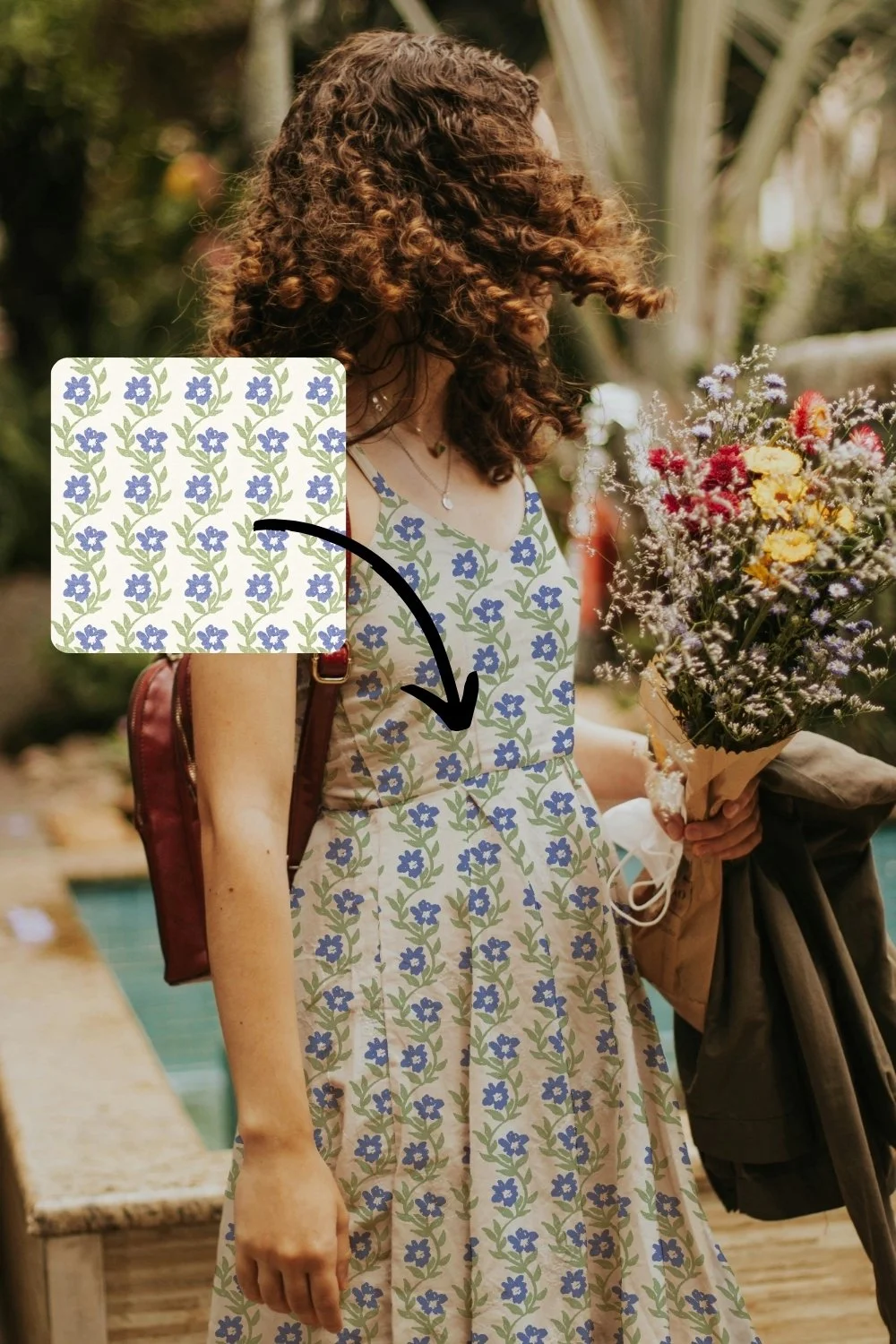
When I first started designing patterns, mockups were the part I dreaded. Not the designing. The mockups.
I could paint a pattern I was proud of, and then I would hit the bit where I was meant to show it on an actual product, and everything slowed down. So if you have found mockups frustrating, I want you to know it is not just you. Here is what a mockup is, why it is worth the effort, and how to make the whole thing far easier than it was for me.
What is a mockup?
A mockup is an image of a real product, a mug, a bolt of fabric, a notebook, a cushion, with your design placed onto it so it looks like it has actually been made. Instead of showing your pattern as a flat square, you show it as a thing someone could pick up.
That is the whole idea. It takes your design out of the file and puts it into the real world, at least on the screen.
Do mockups matter for licensing?
Two reasons, and they are both worth your time.
The first is showing your work to brands. When you want to attract a client, it is lovely for them to see your flat pattern, but it is far more powerful for them to see it on a product. An art director is always trying to picture your design on the things they make. A flat repeat asks them to imagine that. A mockup does the imagining for them, and that makes it so much easier for them to say yes.
The second is quieter, and it is one people do not talk about enough...
Can a mockup help you improve your designs?
Yes, and this is my favourite part. A mockup is a really handy way to work out whether your pattern actually works.
Sometimes a design looks lovely as a flat tile, and then you put it on a mockup and something shifts. The scale feels too big or too small. A motif sits awkwardly once it wraps around a mug. You see ‘rivers’ in your design that you didn’t notice while designing it. You would never have caught it looking at the flat repeat, but on the product it is obvious, and now you can tweak it before you ever show anyone.
Why are mockups so hard to use?
If you have tried mockups and found them painful, here is why. This was my exact experience when I started.
The layers were confusing. I would open a mockup in Photoshop and not be able to work out where my pattern was even meant to go.
They were expensive. Good ones cost money, and it added up fast.
They took a long time. Even once I knew what I was doing, placing a design and getting it right was slow.
And sometimes I paid for a "mockup" that turned out to be a flat JPEG. Basically a flat stock photo, not something I could drop my own design into at all.
Then, when I did have a proper one, actually placing my pattern inside it and scaling it so it looked right was fiddly and frustrating.
None of that is a you problem. It is genuinely how mockups used to be.
How do you make mockups the easy way?
The good news is it does not have to be like that anymore. What you want is a mockup where you drop your pattern in and it places and scales it for you, so you skip the layers and the guesswork entirely.
That is exactly why I made the Magic Mockup Maker, because I did not want anyone else to go through the version I went through. You add your design, and you get a clean, ready-to-use mockup you can put on a sell sheet, pin to Pinterest, or send to a brand.
Frequently asked questions
Do I need Photoshop to use mockups?
Not with the right tool. The reason mockups feel technical is the layers in Photoshop. When the placing and scaling is done for you, you do not need it.
How many mockups do I need?
A few, on the kinds of products you want to license for. If you love the idea of your work on fabric and stationery, show it on fabric and stationery.
Do mockups replace a flat repeat?
No. Show both. The flat repeat proves the pattern works, and the mockup helps a brand picture it on their product.
What if my pattern looks wrong on the mockup?
That is a win, not a problem. You just found something to tweak before a brand saw it.
Where to start
Pick one design you love and put it on one product. That is it. Once you see your own pattern on something real, it is hard to go back to showing flat squares.
If you want the easy way, that is what the Magic Mockup Maker is for.